
Make Visual Novels! Speech Bubble Tools
A downloadable bubble tools
Make Visual Novels! Speech Bubble Tools
Speech bubbles are cool, so they shouldn't be such a pain to edit and set up! So I made these tools to make it easier! These tools come with everything you need to speed up setting up your game's speech bubbles. This bubble editor appears as a thin, horizontally-aligned toolbar at the top of the screen while your visual novel is in developer mode.

Drop down menus from the buttons in the tool bar allow you to directly select style properties and presets directly.

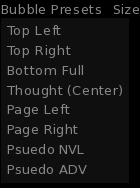
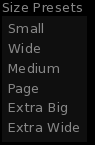
This bar includes all of the core functionality of the built in Bubble Editor, along with the rest of these...
Features!
Use Bubble Presets to quickly set up common bubble configs!
This toolbar includes the ability to set the position, style and size of a bubble with the bubble presets dropdown, letting you quickly set up commonly used bubble configurations.
Use Size Presets to quickly resize your bubbles without moving or restyling them!
In addition to being able to set entire bubble configurations with the bubble presets, it's possible to quickly resize them without changing other properties with size presets. This is great if you want to create a consistent size across your speech bubbles.
Save your own presets!
Find a setup you really like? You can save a bubble's entire configuration or just its size with the toolbar's save functionality. These presets are saved in bubble_presets.json, which you can copy to other projects and use there, too!
Do even more with 7 Bonus Bubble Styles!
Continue Bubble Styles allow an easy way to expand existing bubbles by overlaying the edges of previous bubbles with one of the continuation styles. This includes styles continue_up, continue_down, continue_right and continue_left.
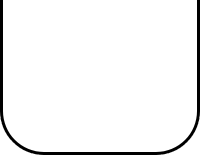
Ping is a bubble great for putting a short bit of dialogue directly from a character in the scene.

Page turns a thought-style bubble into a format more suitable for half-NVL style page bubbles.
Edit your bubble's contents without losing where and how its set up!
Frustrated with adding bubbles and A standalone python script is included to assist in baking IDs on spoken lines throughout your project's RPY files. This script reads through your script.rpy, or other assigned files, for lines of dialogue and assigns each one an ID based on the label the line is in, the referenced character, and the number of times that character has spoken within that label. e.g: start_mint_0002 is the second time that Mint has spoken under the start label. This baking assists in allowing lines of dialogue to maintain their style properties and positions despite changes to the line, such as correcting typos or editing its content. These IDs, also called TLIDs, are also used for translating your script into different languages, so the script serves to assist with that as well. The provided script provides a copy of the script with the added IDs that you can review before renaming and moving or deleting the original!Files included:
- MVNBubbleControls.rpy: This is where the screens and logic is set up for the bubble toolbar. Oh wow, it's kind of a mess in there. Put this in your game folder.
- MVN_BTBubbles.rpy: This is the included collection of new bubble styles are defined. Put this in your game folder, too!
- bubble_presets.json: This is where the premade bubble presets are defined. If you save any of your own presets, this is where they will end up! Put this in your game folder as well!
- gui.zip: This is a zip file containing the required components for the new styles defined in MVN_BTBubbles.rpy. Make sure the files end up in your gui folder under your game folder!
Instructions:
Download everything and put the RPY files and the JSON file into your game folder. Unzip the gui.zip into your gui folder in your game folder.
Now I hate to burst your bubble, but..
This asset is paid. That's right-- Wait, hold on. Why does that say 0?!
WHAT DO YOU MEAN IT'S BECAUSE 0 LOOKS LIKE A BUBBLE?! I don't care that you were trying to match the theme of the pack! We're trying to raise money for the community and to make more stuff!!
Wait, no, no, don't cry! Babygirl, I'm not mad at you! It's just that we can't keep doing everything for free. It costs money to do this cool stuff, you know? It's alright, lets just make sure next time it's actually paid, okay?
Oh crap, was this thing still on? Turn it--
Download
Click download now to get access to the following files:
Comments
Log in with itch.io to leave a comment.
is there a way to use this without breaking renpy?
Edit: the update fixed it. Thanks 😊
Yep. If you're going into it from a completely fresh project, redownload the MVNBubbleControls.rpy and try again.
I missed a bit during testing where if the bubble.json file doesn't exist or the ID is completely unassigned, it would throw an error. That should be fixed now. My B.
Thanks, it seems to be working now 😁